
Case Study: From HTML Injection to Credential Theft
Examining how insufficient HTML sanitization enables credential phishing through attacker-controlled content Full video at https://youtu.be/XDD-hwdWJjY
Relevant CWE: CWE-79 — Improper Neutralization of Input During Web Page Generation ('Cross-site Scripting')
Introduction
When we think about vulnerabilities that lead to account compromise, SQL Injection, Cross-Site Scripting (XSS), and authentication bypasses often come to mind. HTML Injection, however, is frequently overlooked despite its potential to facilitate convincing phishing attacks.
Imagine receiving a link to a login page from a platform you regularly use. You inspect the URL, recognize the domain, and everything appears legitimate. What you don't realize is that the content displayed on the page has been manipulated by an attacker.
This is where HTML Injection becomes dangerous.
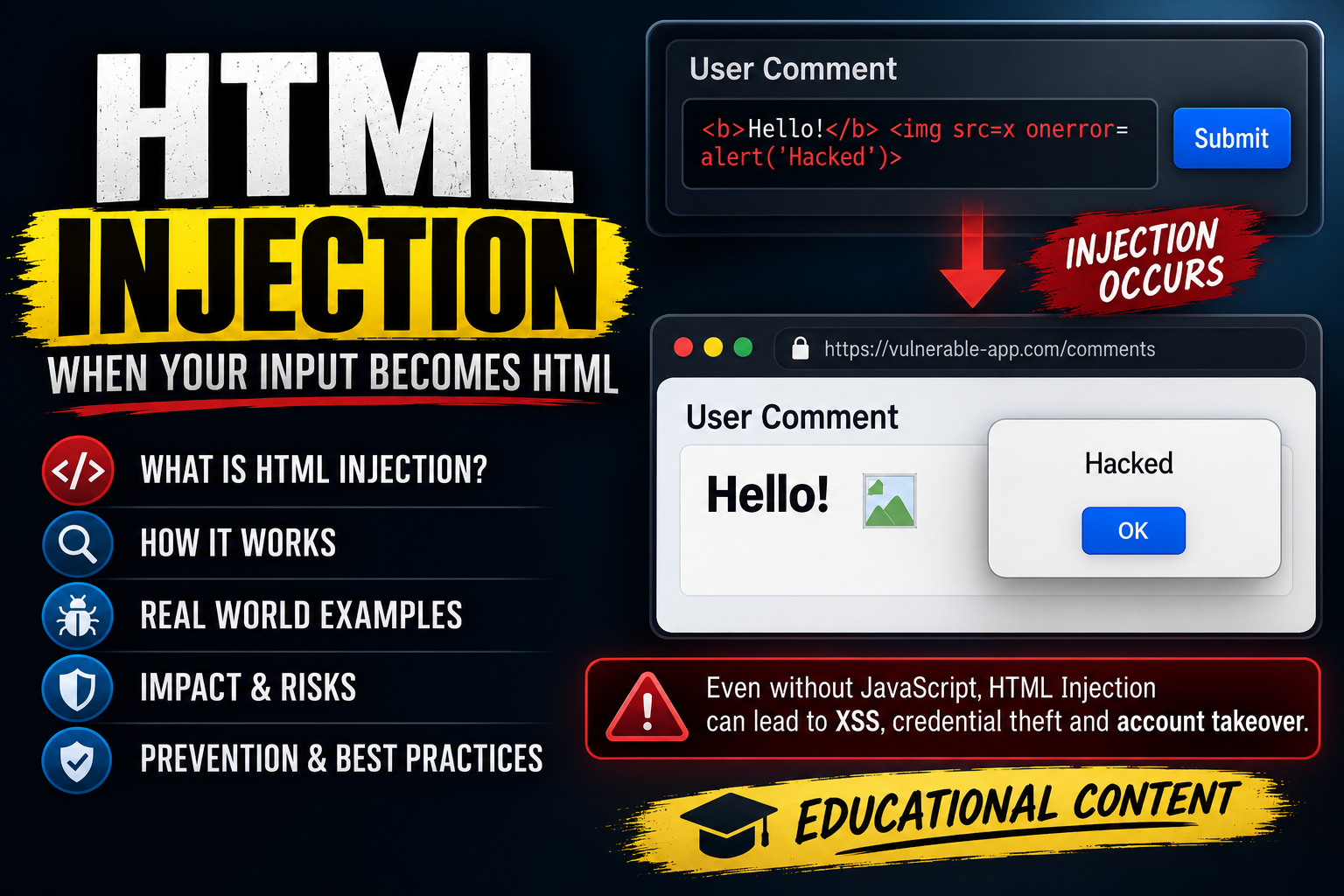
HTML Injection occurs when an application renders untrusted input as HTML markup instead of treating it as plain text. Depending on where that input is rendered and which browser security controls are in place, an attacker may be able to modify visible content, introduce fraudulent forms, or create an entirely deceptive interface.
Unlike traditional phishing attacks that rely on lookalike domains, HTML Injection can allow malicious content to appear directly on a legitimate website.
In this case study, we'll examine how a seemingly harmless login error message can become an entry point for credential phishing.
The demonstration uses CloudDesk, an intentionally vulnerable web application created to reproduce a bug bounty vulnerability in a controlled lab environment.
Understanding the Vulnerability
CloudDesk is a fictional SaaS platform that allows users to authenticate and access their workspace.
When a user enters incorrect login credentials, the application redirects them to the sign-in page and displays an error message.
The message is supplied through the error query parameter:
https://clouddesk.example/signin?error=We couldn't sign you in. Check your email and password, and try again.
Under normal circumstances, this behavior seems harmless. The application reads the parameter and displays the error to the user.
The problem lies in how the application handles that value.
Instead of rendering the parameter as plain text, CloudDesk inserts it into the page as HTML.
For example, consider the following input:
<div>
  <h1>Custom Message</h1>
</div>
If the application safely handles the input, the HTML tags should appear as literal text.
However, if the browser interprets the supplied value as HTML, the user will see a large heading displaying Custom Message.
This indicates that attacker-controlled content is being treated as part of the application's HTML structure.
Now consider the implications of extending that capability beyond a simple heading. What if an attacker could inject styling, introduce new input fields, or construct a fake authentication interface?
The resulting page would still be served from the legitimate application's domain, but the content presented to the user could be attacker-controlled.
Proof of Concept: Exploiting the Login Error Parameter
To demonstrate the vulnerability, we'll use the CloudDesk reproduction lab developed by Ovawatch Security.
Lab repository: CloudDesk HTML Injection Lab — GitHub
The lab recreates an unsafe login-message rendering mechanism and allows us to observe how untrusted input can progress from basic HTML manipulation to more serious security consequences.
Step 1: Identifying the Injection Point
We begin by examining the application's normal authentication behavior.
When invalid credentials are submitted, CloudDesk redirects the user to /signin with an error message supplied through the URL.
/signin?error=We couldn't sign you in. Check your email and password, and try again.
The application displays the parameter's value in the login error message area.
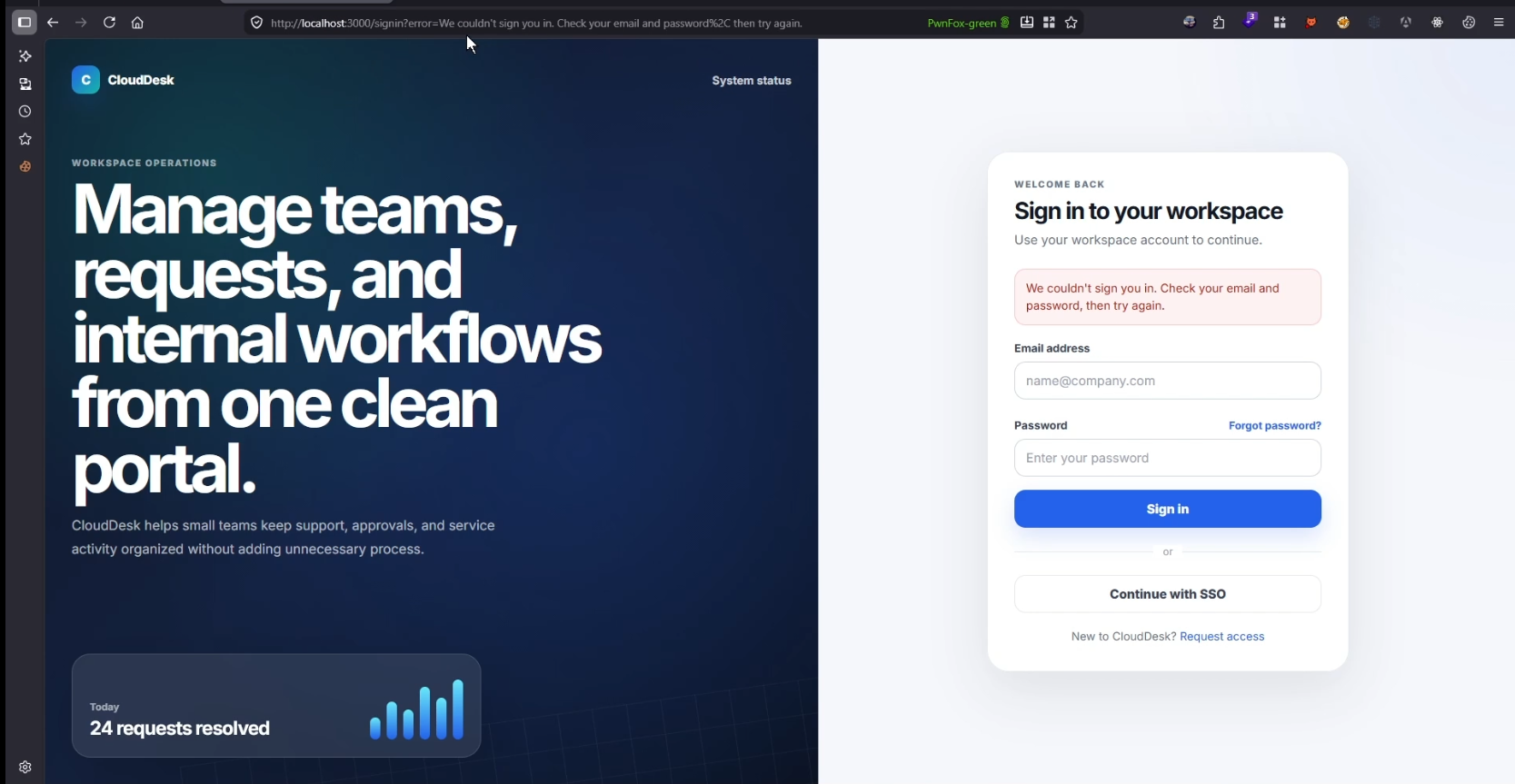
At this stage, the important observation is that the error message can be influenced through a query parameter.
Since URL parameters can be modified by anyone constructing a link, the next step is determining whether the application treats that value as text or HTML.
Step 2: Confirming HTML Injection
To test whether HTML markup is interpreted, we replace the error message with a simple HTML element.
Test payload:
<u>XSS</u>
The resulting parameter becomes:
/signin?error=<u>XSS</u>
The payload is shown in its decoded form for readability. Special characters should be URL-encoded when constructing the actual request.
The <u> element instructs the browser to underline its contents.
If CloudDesk safely escaped the input, the page would display the complete string, including the HTML tags.
Instead, the application renders the word XSS with an underline.
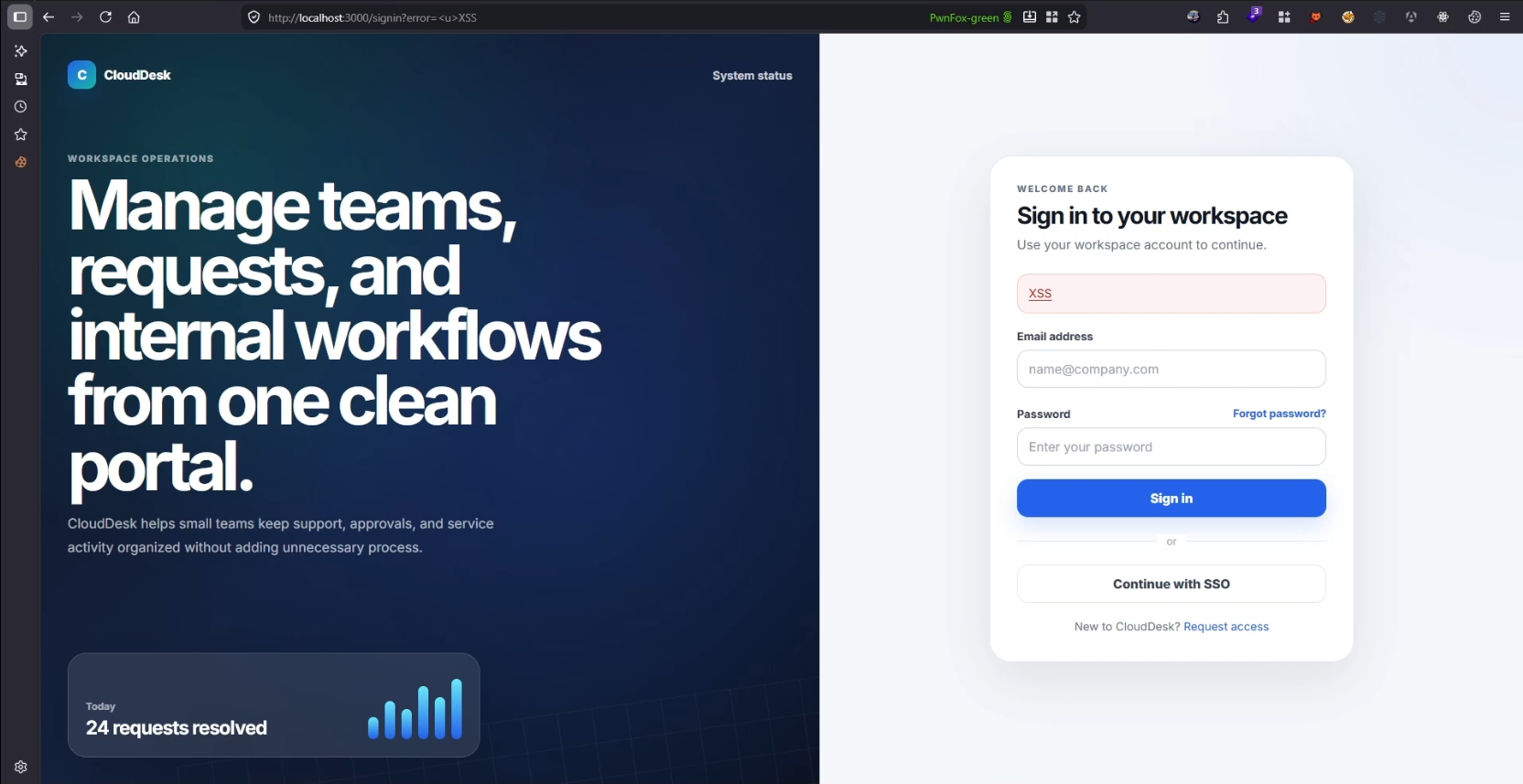
This confirms that the application is interpreting attacker-supplied input as HTML.
Important distinction: Although the test string contains the word XSS, this particular payload only demonstrates HTML Injection. It does not independently prove that JavaScript execution is possible.
Nevertheless, we have identified the first important weakness: untrusted input can influence the page's markup.
Step 3: Manipulating the Page with HTML and CSS
Now that we know HTML elements are being rendered, we can investigate whether the application also accepts inline styling.
This matters because CSS allows an attacker to control the visual appearance of injected elements.
We supply a styled HTML element:
<strong style="color:#d425c6">
  Injected HTML proof: this message was rendered as markup.
</strong>
Instead of displaying the original error message, CloudDesk renders the injected content with the specified color.
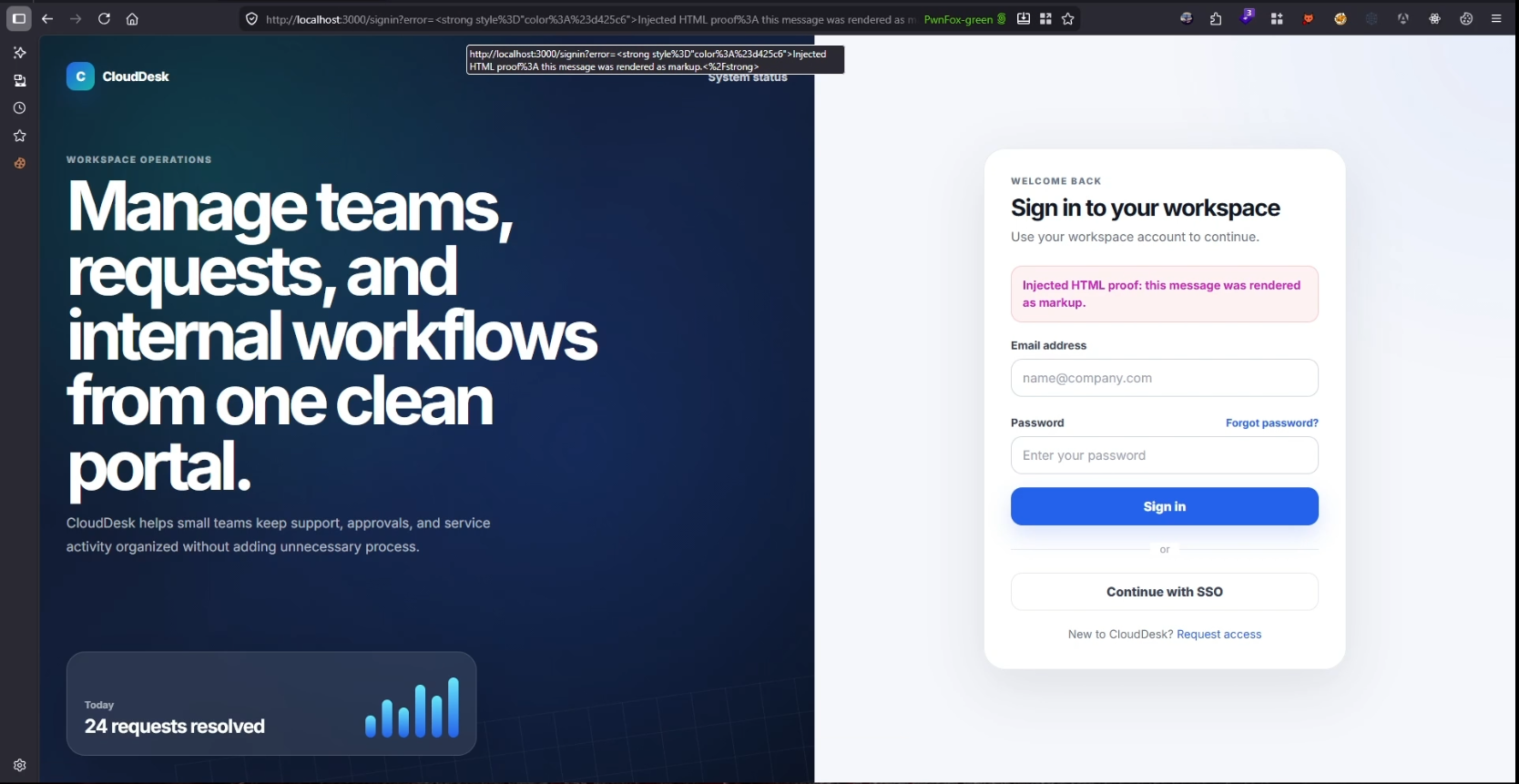
This demonstrates that we are not limited to changing the message text. We can also influence its presentation.
With sufficient control over HTML and styling, attackers may be able to introduce convincing warnings, impersonate application notifications, or display interfaces that encourage users to perform sensitive actions.
At this point, the vulnerability is no longer just about displaying arbitrary text. It becomes a mechanism for manipulating what users see and trust.
Step 4: Replacing the Login Interface
This is where the attack becomes significantly more concerning.
Instead of injecting a heading or a styled message, consider an attacker who creates a complete authentication interface designed to resemble CloudDesk's legitimate sign-in page.
The injected content could include a familiar logo, email and password fields, and a message claiming that the user must reauthenticate to continue accessing their workspace.
In our reproduced attack scenario, the legitimate interface is visually replaced with an attacker-controlled login page.
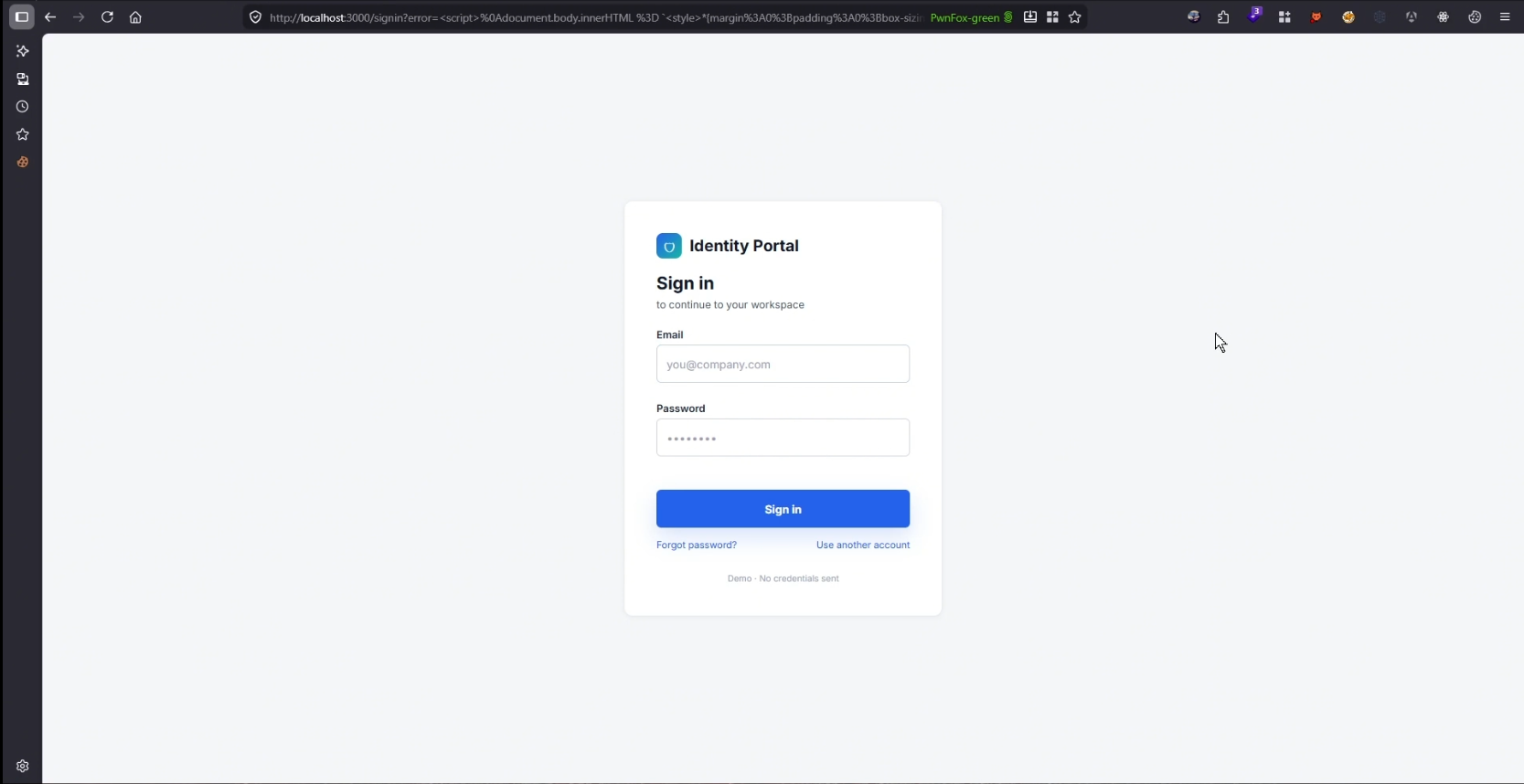
From the victim's perspective, the page may appear legitimate for several reasons:
The browser address bar still displays the trusted application's domain.
The page resembles the platform's original login interface.
The authentication request appears consistent with a normal session-expiration or verification workflow.
This creates an opportunity for credential phishing.
Rather than redirecting the victim to an obvious third-party phishing website, the attacker abuses the legitimate application itself to deliver the deceptive content.
Step 5: Demonstrating the Credential-Theft Impact
The final stage illustrates how an attacker-controlled login interface could be used to obtain credentials.
In the attack scenario, a victim who trusts the displayed form enters their email address and password.
If the injected form is configured to submit those values to an attacker-controlled destination, the credentials can be captured.
The attacker may then return the victim to the original sign-in page, making the interaction appear to be a temporary authentication error rather than a phishing attempt.
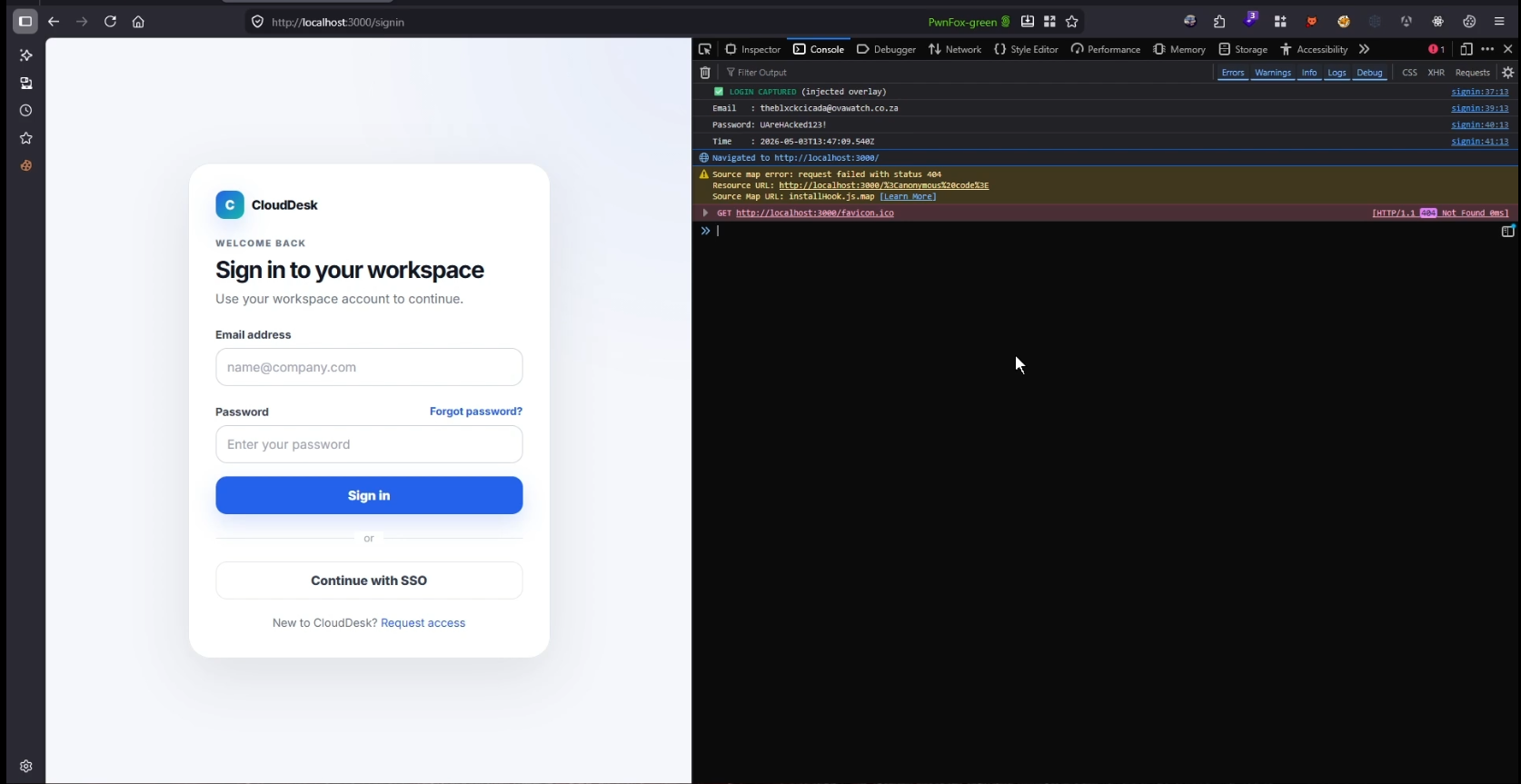
In a real attack, successfully obtaining valid credentials could allow an attacker to attempt unauthorized access to the victim's account, potentially resulting in account takeover.
However, credential theft does not automatically guarantee account compromise. Controls such as phishing-resistant multifactor authentication can significantly reduce that risk.
Lab clarification: The publicly available CloudDesk GitHub demonstration uses a non-exfiltrating page-replacement payload. It does not collect or transmit credentials. The credential-capture scenario illustrates the potential impact of the underlying vulnerability and should be demonstrated only with controlled test credentials.
Root Cause: Why Was This Possible?
The underlying issue is improper handling of untrusted input before rendering it in the browser.
In the CloudDesk lab, client-side JavaScript retrieves the error message from the URL.
The vulnerable behavior can be simplified to:
const params = new URLSearchParams(window.location.search);
const error = params.get("error");

messageBox.innerHTML = error;
The problem is the use of innerHTML with untrusted input.
innerHTML instructs the browser to parse the supplied string as HTML markup rather than render it as plain text.
Consequently, the input can introduce additional HTML elements into the page.
The published CloudDesk lab also explicitly recreates injected <script> elements after inserting the HTML, enabling script execution. This additional behavior is significant because scripts added through ordinary innerHTML assignment do not automatically execute.
This creates two related security concerns:
HTML Injection: An attacker can insert markup that alters the visible page or introduces deceptive interface elements.
Cross-Site Scripting (XSS): When injected content can execute JavaScript, the attacker can potentially perform actions in the security context of the affected application.
In this case, the intentionally vulnerable rendering implementation demonstrates a path from reflected HTML Injection to script execution.
Security Impact
The severity of HTML Injection depends on the application's context, the rendering behavior, and the security controls protecting the page.
When the vulnerability affects a login page, the potential impact is particularly concerning because users are already expecting to interact with authentication forms.
A successful attack could result in:
Credential phishing: Attackers can create deceptive authentication forms within a legitimate website.
Account takeover: Stolen credentials may enable unauthorized access when additional authentication controls are insufficient.
Interface manipulation: Attackers can introduce false security warnings, misleading instructions, or fraudulent verification prompts.
Reputation damage: Users may lose confidence in a platform whose legitimate pages are being abused for phishing.
Financial and operational losses: Compromised accounts may expose sensitive information or enable fraudulent activity, depending on the application's functionality.
An additional concern is scalability.
When an injection can be delivered through a crafted URL, an attacker may be able to distribute the malicious link through emails, messages, or other phishing channels without needing access to individual victim accounts beforehand.
The trusted domain becomes part of the attack's credibility.
Remediation: Preventing HTML Injection
The primary defense is ensuring that untrusted input is never interpreted as executable or structural HTML unless absolutely necessary.
1. Render user-controlled values as text
If an error message does not require HTML formatting, use textContent instead of innerHTML.
Vulnerable implementation:
messageBox.innerHTML = error;
Safer implementation:
messageBox.textContent = error;
This ensures that HTML tags are displayed as text rather than interpreted as elements.
2. Avoid exposing arbitrary error messages through URL parameters
Instead of accepting a complete error message from the URL, applications can use predefined error identifiers.
For example:
/signin?error=invalid_credentials
The client can then map the identifier to an approved message.
const messages = {
  invalid_credentials:
    "Invalid email or password.",
  session_expired:
    "Your session has expired."
};

const code = new URLSearchParams(location.search).get("error");

messageBox.textContent =
  messages[code] ?? "Unable to sign in.";
This reduces the application's reliance on arbitrary URL-supplied content.
3. Sanitize HTML when rich formatting is required
If an application genuinely needs to render user-supplied HTML, use a well-maintained HTML sanitizer with a restrictive allowlist.
Untrusted content should not be able to introduce dangerous elements, event handlers, or unauthorized destinations.
4. Implement a restrictive Content Security Policy
A properly configured Content Security Policy (CSP) can provide an additional layer of protection.
For example, appropriate script-src restrictions can limit unauthorized script execution, while form-action 'self' can restrict where HTML forms submit their data.
CSP is a defense-in-depth control, not a replacement for correct output handling and contextual sanitization.
5. Include HTML Injection in security assessments
During web application penetration testing, attention should be paid to locations where user-controlled values influence the rendered interface, particularly:
Login and authentication error messages
Search result pages
Notification banners
User profile information
Redirect and status messages
These areas may appear low-risk but can become valuable attack surfaces when untrusted content is rendered in a security-sensitive context.
Conclusion
This case study demonstrates how a seemingly minor input-handling weakness can introduce serious security risks.
What began as a simple login error parameter allowed us to render arbitrary HTML, manipulate styling, and demonstrate how an application's trusted interface could be abused for credential phishing.
The central issue was not the presence of a query parameter. It was the decision to trust and render its contents as HTML without appropriate safeguards.
A trusted domain does not automatically mean the content displayed on that domain is trustworthy.
For developers, the lesson is to treat untrusted input according to its intended context and avoid unsafe HTML rendering.
For security researchers, the lesson is to assess how an injection affects the application's workflow rather than stopping at the first visible proof of markup rendering.
Sometimes, the difference between an apparently harmless HTML Injection and a serious security finding is understanding how that injection can be abused within a trusted user journey.
Reproduce the Vulnerability
Explore the intentionally vulnerable application and review the reproduction steps in the Ovawatch Security GitHub repository.
View CloudDesk HTML Injection Lab on GitHub
This case study is based on a controlled lab reproduction. CloudDesk is a fictional application. No real customer accounts or production systems were used in the published lab.
Ovawatch Security — Application Security Research & Penetration Testing
About the author
- Ovawatch Security Pty (Ltd) is a cybersecurity company focused on penetration testing, application security, and real-world vulnerability research. We share technical findings, attack techniques, and practical remediation insights across web applications, APIs, Active Directory, and cloud environments.
Comments
Join the discussionNo comments yet. Be the first to comment.
Web Application Security: Technical Case Studies
Exploring real-world vulnerability patterns through controlled lab reproductions, technical exploitation walkthroughs, root cause analysis, and practical remediation techniques.